
Watch Face PathTime1.5 - Google Play
You'll be able to see results in few seconds.
Publisher Description
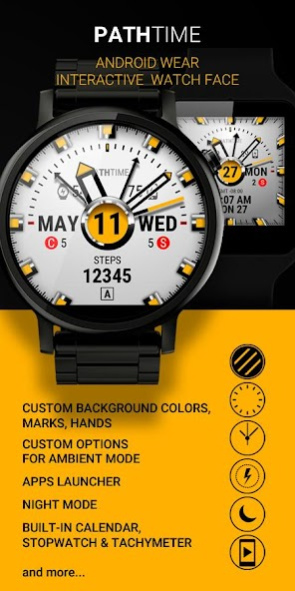


Watch face for smartwatches with:
- steps counter;
- battery level(watch/smartphone);
- smartphone state info (Vibration mode; WiFi/Data connectivity);
- missed calls and SMS counters;
- launcher apps from smartwatch on smartphone;
- built-in calendar;
- stopwatch with tachymeter;
- steps-B counter;
- second time (GMT timelines);
- custom background colors (gradient, 2 colors);
- custom watch hands;
Working fine on oldest and newest models on any screen (round/square).
Warning: this watch face ONLY for "Wear OS by Google" smartwatches.
Configuration supported languages
- English
- Français
- Deutsch
- Українська
- Русский
- 中文 (繁體)
Note: to work correctly reading the number of steps necessary to synchronize the clock with Google Fit app on your smartphone.
About Watch Face PathTime
The company that develops Watch Face PathTime is Mobi Market Labs. The latest version released by its developer is 1.5.
To install Watch Face PathTime on your Android device, just click the green Continue To App button above to start the installation process. The app is listed on our website since 2016-10-30 and was downloaded 0 times. We have already checked if the download link is safe, however for your own protection we recommend that you scan the downloaded app with your antivirus. Your antivirus may detect the Watch Face PathTime as malware as malware if the download link to com.mobimarketlabs.pathtime is broken.
How to install Watch Face PathTime on your Android device:
- Click on the Continue To App button on our website. This will redirect you to Google Play.
- Once the Watch Face PathTime is shown in the Google Play listing of your Android device, you can start its download and installation. Tap on the Install button located below the search bar and to the right of the app icon.
- A pop-up window with the permissions required by Watch Face PathTime will be shown. Click on Accept to continue the process.
- Watch Face PathTime will be downloaded onto your device, displaying a progress. Once the download completes, the installation will start and you'll get a notification after the installation is finished.
Program Details
System requirements
Download information
Pricing
Version History
version 1.5
posted on 2016-10-30
- new borders (Configuration->Background->Border);
- switch steps metrics (steps/meters; Configuration->Walk);
- AM/PM indicator (day number - top or bottom);
- small bug fixes.
version 1.5
posted on 2016-10-31
- new borders (Configuration-> Background-> Border);
- switch steps metrics (steps/meters; Configuration-> Walk);
- AM/PM indicator (day number - top or bottom);
- small bug fixes.
Disclaimer
Official Google Play Link
We do not host Watch Face PathTime on our servers. We did not scan it for viruses, adware, spyware or other type of malware. This app is hosted by Google and passed their terms and conditions to be listed there. We recommend caution when installing it.
The Google Play link for Watch Face PathTime is provided to you by apps112.com without any warranties, representations or guarantees of any kind, so access it at your own risk.
If you have questions regarding this particular app contact the publisher directly. For questions about the functionalities of apps112.com contact us.
